
 By
By iOS 27 started rolling out to iPhones on Monday, September 14, and it’s a bigger update than Apple usually ships in September. The headline item is a rebuilt version of Siri that Apple is calling Siri AI, but there’s also a genuinely useful set of AI photo editing tools, a quieter refinement of the Liquid Glass look introduced last year, and a long list of smaller changes that most people will bump into within the first week of using the update. Not everything here is as dramatic as Apple’s own marketing suggests, and a fair amount of it depends on which iPhone you own. Here’s what’s actually in the update.
What’s new in iOS 27?
The short version: Siri finally gets the AI overhaul Apple promised back at WWDC 2024 and then quietly delayed. It arrives as a beta, in English only, and it’s gated to iPhone 15 Pro and newer. Photos picks up three AI editing tools that let you change a photo’s composition after the fact, not just crop or retouch it. Safari, Mail, Messages, Shortcuts and the Home app all get smaller Apple Intelligence features layered into things people already do. And underneath all of that, Apple says app launches, Photos library loading and AirDrop transfers are meaningfully faster across the board, regardless of whether your phone supports any of the AI features at all.
iOS 27 is a free update available now through Settings → General → Software Update. It’s compatible with the same range of iPhones as last year’s iOS 26 — going back to the iPhone 11 — but running the update and getting the new AI features are two separate questions, and Apple has been fairly upfront about where that line sits.
Siri AI gets its biggest upgrade yet
Apple has spent nearly a decade fielding jokes about Siri falling behind ChatGPT and Google Assistant. iOS 27 is Apple’s answer, and it’s a substantial rework rather than a bolt-on chatbot. Siri AI runs on what Apple describes as a next-generation Apple Foundation Model, and multiple reports — including from MacRumors’ iOS 27 coverage — indicate Apple built parts of that model in partnership with Google, drawing on Gemini research, though Apple itself hasn’t detailed the technical arrangement publicly. Processing happens on-device where possible and through Apple’s Private Cloud Compute servers when a request needs more horsepower.
In practice, that means three things changed. First, Siri can hold a real back-and-forth conversation instead of resetting after every request — you can ask a follow-up question that refers to something you said a minute ago without repeating yourself. Second, Siri now has what Apple calls personal context and onscreen awareness, so it can look at what’s open on your screen or pull details from your own apps to answer a question, rather than only searching the web. Third, Siri can take action inside supported apps: reschedule something on your calendar, add a song to a playlist, or edit a message you’re drafting, based on what Apple’s own materials describe. A small number of third-party apps, including fitness and hydration-tracking apps, are also opting in to let Siri search or act within them.
There’s a new dedicated Siri app, separate from the old floating Siri interface, where your conversations are saved and synced across your Apple devices through iCloud. You can start a question on your iPhone and pick it back up on an iPad later. Siri also moved into the Camera app through something Apple calls Siri mode, which folds in Visual Intelligence — point the camera at a restaurant bill and ask Siri to split it, or at a plate of food and ask about roughly how many calories are in it.
Two more additions worth knowing about: Write with Siri, which can draft text from scratch or edit something you’ve already written almost anywhere you can type, including inside Messages and Mail, where it tries to match your usual tone and punctuation with specific people. And a new voice experience that lets you adjust how expressive or fast Siri sounds — though the more natural on-device version of that voice, along with more accurate dictation, is limited to the iPhone 17 Pro and iPhone Air, since it depends on on-device models those chips can run locally.
None of this is finished software yet. Siri AI ships as a beta, it’s English-only at launch, and Apple has confirmed it’s not available in the European Union initially because of Apple’s ongoing regulatory dispute with the European Commission. Apple has also said some Apple Intelligence features that rely on server-side processing — Siri AI among them — are subject to daily usage limits, and the company has floated the idea of paid tiers with higher limits down the road, though nothing about pricing has been finalized. If you’ve been hoping for a Siri that behaves like a finished product on day one, temper expectations accordingly.
Photos gets powerful new AI editing tools
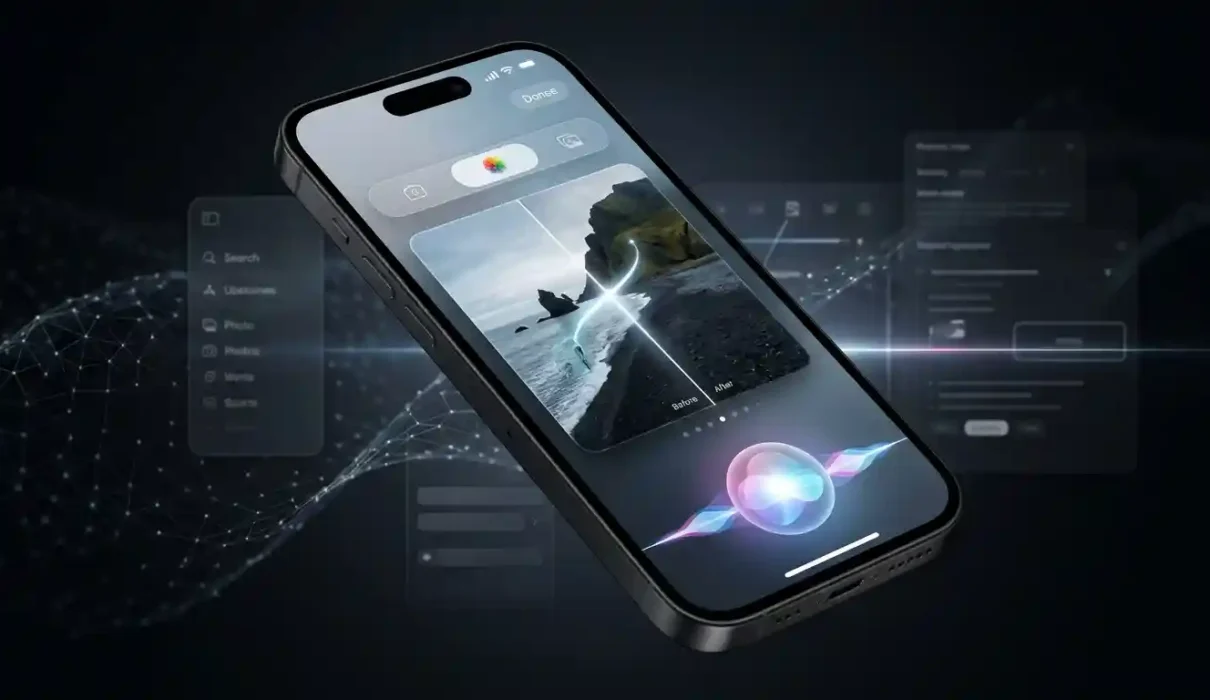
The Photos app is where iOS 27’s Apple Intelligence work is easiest to actually see and use, and it’s arguably the more interesting part of this release than Siri. Three tools land inside a new Tools section of the editor, marked with an Apple Intelligence icon.
Spatial Reframing is the one nobody else offers. It doesn’t crop your photo — it changes the apparent camera angle after the fact. You drag the photo on screen and Apple’s models generate the pixels that would have been visible had you actually moved the camera, building on spatial modeling Apple originally developed for Vision Pro. Say you took a photo of your kids from standing height and it came out a little flat — Spatial Reframing can make it look as though you’d crouched down to their eye level instead, filling in only the new area the perspective shift reveals while leaving the rest of the image untouched. At WWDC, an Apple engineer demoed exactly this on a photo of his children, and it’s a genuinely different capability from anything a simple crop or straighten tool can do. It’s also, worth saying plainly, a tool that can change where a person in a photo appears to be looking — which is a bigger edit than “fixing the composition,” whatever Apple calls it.
Extend does something more familiar: it expands the image beyond its original edges, generating realistic new content to fill the gap. That’s useful for straightening a crooked horizon without losing anything important, switching a photo’s aspect ratio for a different platform, or just giving a subject more breathing room in the frame.
Clean Up isn’t new — it’s been in Photos since iOS 18 — but it’s meaningfully better here. It can now remove larger objects from a scene and reconstruct what’s behind them with more convincing results, and you get a choice between a Fast mode for small blemishes and a High Quality mode for more complex edits.
Apple keeps the original photo intact behind every edit, so you can always revert. It’s also worth knowing these tools alter what a photograph actually shows, which is exactly the tension Apple’s own software chief acknowledged when he said at WWDC that the company is conscious of AI’s effect on whether people can trust photos as a record of what really happened. Apple has reportedly built in a hidden identifier for AI-edited images, and on the new iPhone 18 Pro there’s a separate feature called Apple Reference Image that keeps a verified, untouched original stored alongside any edit. Outside of that specific pairing, though, Apple hasn’t published details on exactly how edited photos are flagged.
Beyond the AI tools, Photos also picks up more ordinary quality-of-life changes: pulling a single frame out of a video, more flexible slideshow options, and finer control over iCloud Shared Albums, which now support full-resolution photos.
Other Apple Intelligence features worth knowing about
Apple spread Apple Intelligence across more of the system than just Siri and Photos, and some of these smaller additions are the kind of thing you’ll only notice when you happen to need them.
- Safari can now group your open tabs by topic automatically, watch a webpage and notify you when something changes — like a price drop or an item coming back in stock — and build a custom browser extension from a plain-language description.
- Mail can surface relevant actions based on what’s in an email, such as pulling up directions to a restaurant after you’ve booked a table.
- Messages can spot when someone’s asking you for a photo mid-conversation and suggest the relevant one from your library, and Smart Reply suggestions now draw on your own writing style so they read less like generic autocomplete.
- Shortcuts lets you describe an automation in plain English and have it built for you, with a “describe a change” option to refine it afterward, plus a manual editor if you want to tweak the result by hand.
- Image Playground moves to a new generative model that can produce photorealistic images, not just illustrated styles, and can generate personalized Lock Screen wallpapers and Contact Posters.
- Home app gets AI-generated summaries of what happened in HomeKit Secure Video clips and the ability to search camera footage by describing a moment, though both require an eligible iCloud+ plan.
- Accessibility features benefit too — VoiceOver gives richer descriptions of photos and charts, Magnifier adds conversational guidance for low-vision users, and Voice Control lets you navigate an app by describing what’s on screen in your own words.
Apple has been explicit that several of these — Siri AI, the Photos editing tools, Image Playground and AI features in Shortcuts among them — run through server-side models and carry daily usage limits, according to Apple’s own feature page. Apple hasn’t published the exact numbers.
Other changes coming with iOS 27
iOS 27 isn’t only about AI, even if that’s most of what Apple talked about on stage. The Liquid Glass interface introduced in iOS 26 gets refined rather than reinvented — Apple says contrast and readability are improved, and there’s a new slider in Settings that lets you dial the look anywhere from more transparent to more heavily tinted, which is a direct response to complaints that last year’s glassy interface was sometimes hard to read.
Apple is also promoting real performance gains: it says app launches, Photos library loading, and AirDrop transfers are all faster on iOS 27, independent of any AI feature. Spotlight search, along with search inside Photos and Mail, is described as more relevant and comprehensive. There’s a new Connectivity Assist feature meant to smooth out the handoff between Wi-Fi and cellular so your connection doesn’t stall during the switch.
Child safety got a real update too, not just AI polish. Parents can now approve individual apps when setting up a child’s iPhone, require approval before a child visits a new website through a new Ask to Browse option, and set Time Allowances and Schedules that control which apps are available and for how long, based on the child’s age. Communication Safety, which already blurred nudity in Messages and FaceTime, now also blurs graphic violence. Screen Time’s settings have been redesigned to make all of this easier for parents to actually configure.
Smaller additions round things out: AirPods gain a custom equalizer, the Health app’s cycle tracking adds support for perimenopause and menopause, and Alarms and Timers now have independent volume controls — a small fix for anyone who’s ever been startled awake at full volume by a timer they meant to keep quiet.
Which iPhones support iOS 27?
iOS 27 installs on the same range of devices as last year’s iOS 26: the iPhone 11 and later, including the iPhone SE (2nd generation) and newer. If your iPhone ran iOS 26, it’ll run iOS 27. That’s the easy part.
Which iPhones get the new AI features?
This is where it gets more complicated, and it’s worth being precise about it because installing the update doesn’t mean you’ll see everything described above.
According to Apple’s official iOS 27 support page, Siri AI and the broader set of Apple Intelligence features across apps — including the new Photos editing tools, Safari’s AI features, Image Playground, and the rest — require an iPhone 15 Pro, iPhone 15 Pro Max, or any iPhone 16 model or later. That leaves out the standard iPhone 15, iPhone 14, and everything older. Owners of those phones can install iOS 27 and get the Liquid Glass refinements, performance improvements, child safety features, and other non-AI changes, but not Siri AI or anything else built on Apple Intelligence.
There’s a further split within that group. The most natural-sounding Siri voice, with adjustable expressivity and pace, along with more accurate on-device dictation, is limited specifically to the iPhone 17 Pro and iPhone Air, because that version relies on a heavier on-device model those chips are built to run. An iPhone 15 Pro gets Siri AI, but not that particular voice experience.
So there are really three tiers here: iPhones that can simply install iOS 27, iPhones that also get Apple Intelligence and Siri AI, and the newest two models that get the most refined on-device voice and dictation on top of that. It’s an unusually granular split for an Apple software release, and it’s worth checking Apple’s feature availability page before assuming your phone gets a specific feature you’ve read about.
Should you update to iOS 27?
For most people, yes — there’s little reason to hold off. The performance claims, the child safety improvements, and the Liquid Glass tweaks apply to every supported iPhone, AI-capable or not, and none of it comes with obvious tradeoffs. If you’re on an iPhone 15 Pro or newer, the Photos editing tools alone are worth trying; Spatial Reframing and Extend do things that used to require a separate editing app, and they’re built right into the app you already use to browse your library.
Siri AI is the one piece worth going in with realistic expectations. It’s a beta, it’s English-only, it’s not available in the EU yet, and Apple itself is still working out how usage limits and potential paid tiers will function. If your main reason for updating is to finally get a smarter Siri, it’s a real improvement over the assistant Apple has shipped for the last decade — but it’s not going to feel like a finished product for a while yet, and some of what Apple demoed at WWDC, like Spatial Reframing changing where someone appears to be looking in a photo, is worth trying with a clear sense of what it’s actually doing to your images, not just what Apple calls it.
To update, go to Settings → General → Software Update, and if you have an eligible iPhone, Siri AI itself needs to be turned on separately once the update is installed, through Settings → Siri. For the full rundown, Apple’s own release notes are available on its iOS 27 update support page, and general background on how Apple Intelligence works across devices is on Apple’s Apple Intelligence page.
Frequently Asked Questions About iOS 27
Is iOS 27 available now?
Yes. Apple released iOS 27 on September 14, 2026, making the update available for compatible iPhone models through the Software Update section in Settings.
What are the biggest new features in iOS 27?
Some of the biggest changes include major Siri improvements, new Apple Intelligence capabilities, updates to the Photos app, interface changes, and a range of improvements across Apple’s built-in apps and services.
What has changed with Siri in iOS 27?
iOS 27 introduces a more capable Siri experience with improved conversational abilities and deeper integration with apps and on-device information. Some advanced Siri and Apple Intelligence features depend on the iPhone model, language, region and feature availability.
What new features are coming to Photos in iOS 27?
The Photos app receives several improvements in iOS 27, including new AI-powered editing capabilities and tools designed to give users more control over how their photos are framed and edited.
Does every iPhone support all iOS 27 features?
No. While a number of iPhone models may support iOS 27, some Apple Intelligence and advanced AI features require compatible hardware. Feature availability can also vary by language and region.
How do I update my iPhone to iOS 27?
On a compatible iPhone, open Settings > General > Software Update. If iOS 27 is available for your device, you can follow the on-screen instructions to download and install it. It is recommended to back up your iPhone before installing a major software update.
Is iOS 27 free?
Yes. iOS updates are provided by Apple at no additional charge for compatible iPhone models.
Will iOS 27 make my iPhone faster?
Performance can vary depending on the iPhone model, its battery condition and how it is being used. iOS 27 includes software improvements, but that does not mean every older iPhone will become faster after updating.
Should I install iOS 27?
For compatible iPhones, iOS 27 brings new features, security updates and system improvements. Before updating, make sure your important data is backed up and check whether the features you are interested in are supported on your particular iPhone.
Do I need a new iPhone to use the new Siri AI features?
Not necessarily for every Siri improvement, but Apple’s more advanced Apple Intelligence features require compatible hardware. The exact features available depend on the iPhone model, language and region.