
 By
By So the live semi-finals are here. You have a favourite act. Maybe it’s a comedian who made you cry laughing. Perhaps a singer who gave you actual goosebumps. Or a magician you still can’t figure out.
Either way, you want to vote.
And here’s the thing that catches a lot of viewers out: you cannot vote by phone anymore. Not since 2024.
These days, the only way to have your say on Britain’s Got Talent is through the official app. No redial buttons. No premium rate numbers. Just a few taps on your phone.
This guide walks you through everything. Downloading the app. Setting it up. Getting your five free votes. Fixing the app when it inevitably gets cranky during the live final. And yes – I will also tell you exactly what to do if the app decides to crash two minutes before voting closes.
Let’s get you voting.
What Is the Britain’s Got Talent App?
Let’s start simple.
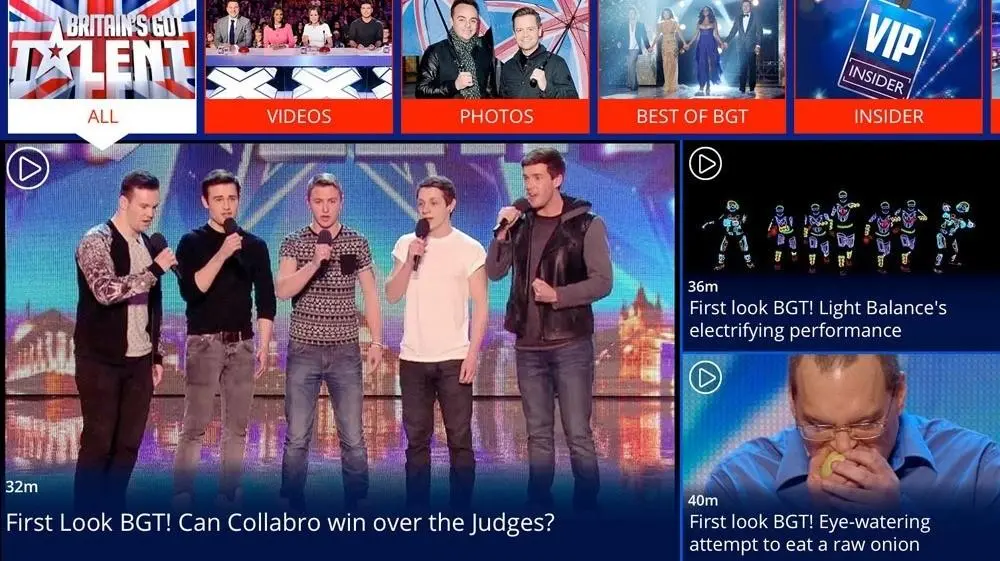
The Britain’s Got Talent app is the official Britain’s Got Talent show page companion – the ITV mobile application for the show. You can think of it as your backstage pass, voting booth, and live notification system all rolled into one.
But here is what matters most: the app is the only way to vote for free.
ITV scrapped phone voting a couple of years ago. You used to dial numbers, listen to a recorded message, and pay 50p a go. Not anymore. Now you download the app, sign in, and tap to vote.
That change was controversial. A lot of viewers complained. But ITV stuck with it because it cuts down on vote fraud and gives them better data. Love it or hate it – this is how BGT works now.
Beyond voting, the app gives you:
- Exclusive clips you will not see on television
- Push notifications when voting opens and closes
- Contestant profiles with their full audition history
- Live leaderboard updates (anonymised, but you see the top three)
- Polls and quizzes during the ad breaks
The app is free. It works on iPhone and Android. And yes – you really do get five free votes every single live round.
No catch. No hidden subscription. Just five genuine free votes.
How to Download the Britain’s Got Talent App
Right. Let us get the app on your phone.
Android installation
If you have an Android phone – Samsung, Google Pixel, Xiaomi, OnePlus, or anything else – here is what you do.
- Open the Google Play Store.
- Search for “Britain’s Got Talent” or “ITV BGT”.
- Look for the developer name: ITV plc. That is the official one. Google Play Store – BGT app by ITV plc is the only safe download.
- Tap Install.
- Wait a few seconds. The app is not huge – about 80MB.
You will need Android 10 or newer. If your phone is older than that, the app might refuse to install. In that case, you can still vote through the ITVX website on your mobile browser.
iPhone/iOS installation
For iPhone users, the process is almost identical.
- Open the App Store.
- Search for “Britain’s Got Talent”.
- Confirm the developer is ITV plc again. App Store – Britain’s Got Talent official app (check live URL).
- Tap the cloud icon or GET.
- Use Face ID, Touch ID, or your password to confirm.
You need iOS 15 or later. That covers pretty much every iPhone from the iPhone 8 upwards. If you are still clinging to an iPhone 6, you are out of luck – time to upgrade or use ITVX on a computer.
Is the app free?
Yes. Completely free to download.
You can also vote for free – five times per live round.
However, there are optional in-app purchases. If you want more than five votes, you can buy extra votes for 10p each. You can buy up to 30 extra votes per round. But honestly? Most people never bother. The five free votes are usually enough unless you are absolutely obsessed with one act.
How to Register and Set Up the App
Once you have installed the app, you need to set it up. You cannot vote without registering. This is where a few people get stuck, so read carefully.
- Step 1 – Open the app: Tap the BGT icon.
- Step 2 – Sign in or create an ITV account: Tap “Sign in” → “Create account”. Use an email address you actually check (they send vote confirmations).
- Step 3 – Verify your UK mobile number: ITV sends a six-digit code by SMS. Your number must be a UK mobile (07xxx). One mobile number per account.
- Step 4 – Allow notifications: Tap Allow. If you turn off notifications, you will miss the voting window (only 15–20 minutes long).
- Step 5 – Enable location services: Select “While using the app”. ITV needs to confirm you’re in the UK for broadcast rights.
Once you complete these steps, you are ready to vote.
How to Vote on Britain’s Got Talent Using the App
This is what you came for.
Step-by-step voting process
Voting only opens during live shows (semi-finals and grand final). You cannot vote during audition episodes.
- Open the BGT app – do this during the final ad break before voting starts.
- Tap the large pink “VOTE NOW” button on the home screen.
- You’ll see a grid of all the acts from that night’s show.
- Tap the act you want to vote for.
- Choose free vote or paid vote (if you want extra).
- Confirm your choice – you’ll see a green tick and “Vote confirmed”.
- Repeat for your remaining free votes, but remember: you cannot vote for the same act twice with free votes.
How many votes do you get?
- 5 free votes per live round (semi-final or final)
- Each free vote must go to a different act
- You can buy up to 30 extra votes (10p each)
- Free votes reset each new live show
When does voting open and close?
This is critical.
- Voting opens immediately after the last performance of the night (usually 9:35pm–9:40pm).
- Voting closes 15 to 20 minutes later. The app shows a countdown timer.
- When the timer hits zero, voting stops instantly. Late votes are voided. ITV official voting terms and conditions explain this in full legal detail.
Important voting rules
- You cannot vote for the same act twice with free votes.
- Paid votes can go to the same act repeatedly (max 30 total).
- Each ITV account can only vote once per device per round.
- Votes are final – no refunds.
Features of the Official BGT App
Voting is the main event. But the app does a few other useful things.
- Exclusive clips – backstage videos you won’t see on TV.
- Contestant updates – follow acts and get social media highlights.
- Polls and quizzes – kill time during ad breaks.
- Live leaderboard – anonymised top three acts, updated every 60 seconds.
- Push notifications – reminders 5 minutes before voting opens and 2 minutes left.
Britain’s Got Talent App Not Working? Common Fixes
Let’s be honest. The app can be temperamental during live shows. Thousands of people all hammering the servers at the same time. Things go wrong.
App crashing on opening
Fix: Force close the app and reopen. On iPhone swipe up from bottom and flick away; on Android go to Settings > Apps > BGT > Force Stop. Restart your phone if needed.
“Vote” button is greyed out
Fix: Voting not open yet OR the app thinks you’re outside the UK. Check the time, enable location permissions, and disable any VPN. ITV help centre – regional restrictions has more details.
“You have reached your free vote limit” but you haven’t voted
Fix: Someone else on your WiFi network may have voted using a different ITV account. Switch from WiFi to mobile data (4G/5G) and clear app cache (Android).
SMS verification code never arrives
Fix: Wait 60 seconds, double-check your number (starts with 07), check blocked messages folder. Some networks (Three, Lebara) have delays – request the code before the live show starts. Ofcom premium rate voting regulations cover your rights if verification fails repeatedly.
App says “not available in your region” when you are in the UK
Fix: Disable any VPN. Check phone region settings: iPhone → General → Language & Region → United Kingdom; Android → System → Languages & input → Region → UK.
Can You Use the BGT App Outside the UK?
Short answer: no.
The app is geo-locked. It checks your IP address and GPS location. Both must say United Kingdom. A VPN won’t help – ITV blocks known VPN IPs. ITV help centre – regional restrictions confirms this.
If you are a UK citizen on holiday: You cannot vote. Sorry. Ask a friend back home to vote on your behalf.
If you have moved abroad: You’ll need a UK-based friend with a UK mobile number to set up the app. Even then, detection is likely.
Is the Britain’s Got Talent App Safe?
Yes. But with the usual caveats.
The app is published by ITV plc, a legitimate UK broadcaster regulated by Ofcom. ITV plc privacy policy and data protection explains how your information is handled. The app asks for location, notifications, storage, and phone state (for SMS). None of these are unusual.
ITV keeps voting data for 12 months (Ofcom requirement) and does not sell personal info for marketing.
What to watch out for: Fake “BGT voting” apps appear every year. Only download from the official ITV plc developer page. Report fake BGT voting apps to Action Fraud UK if you spot one. Never pay for votes outside the official in-app purchase system.
Tips for Using the App During Live Shows
- Vote early – first five minutes after voting opens are smoothest.
- Close other apps – streaming, Twitter, WhatsApp all use resources.
- Use WiFi if reliable – otherwise switch to 4G/5G.
- Keep your phone charged – plug it in before the show starts.
- Set a manual timer for 9:35pm as a backup to notifications.
- Screenshot your confirmation – evidence if something goes wrong.
- Have a backup device – install the app on an old phone or tablet using the same ITV account.
Frequently Asked Questions (FAQ)
You get five free votes per live round. Each free vote must go to a different act. You cannot give two free votes to the same person.
No. Voting closes 15 to 20 minutes after the last performance ends. Once the countdown timer hits zero, the vote button disappears. Late votes are voided.
The vote button only appears during live shows when voting is open. Check that location services are enabled and that you’re not using a VPN.
Yes. You must create or sign in to a free ITV account and verify a UK mobile number.
Yes, but only with parental permission. The app is rated 12+. PEGI app rating explanation for parents explains the system. In-app purchases require a password or biometric confirmation, so children cannot accidentally buy votes.
No. The app performs a location check every time you open it. If your iPad detects a non-UK IP or GPS location, voting is blocked.
You will see a green tick and “Vote confirmed” on screen. You will also receive a confirmation email within 10 minutes to your ITV account address. No email = no vote (check spam).
ITV Britain’s Got Talent |
Ofcom voting code |
ITV voting T&Cs |
ITV privacy policy
Conclusion
Voting on Britain’s Got Talent used to be simple. You picked up the phone, dialled a number, and hoped you got through. Now it is all through the Britain’s Got Talent app.
That change has frustrated some viewers. But once you get the hang of it, the app is actually quicker. No busy signals. No premium rate charges. Just five free votes, a few taps, and you are done.
Here is your game plan for live show night:
- Download the official BGT app from ITV plc before the semi-finals start.
- Set up your ITV account and verify your UK mobile number.
- Allow notifications and location permissions.
- Open the app early – before voting opens.
- Use your five free votes on different acts.
- Screenshot your confirmations.
- If the app fails, switch to ITVX on your browser as backup.
And please – do not leave your votes until the last two minutes. The app gets slow. Nerves get high. Votes get lost. Vote early, vote smart, and enjoy the show.
Good luck to your favourite act. May the best performer win. Latest BGT 2026 schedule and results are available on the official ITV site. Follow UKTechWire for more updates!

Jalees Ur Rehman is an SEO professional with 13+ years of experience in SEO and Digital Marketing. He helps businesses grow organic traffic and conversions through data-driven digital marketing strategies and practical execution.