
 By
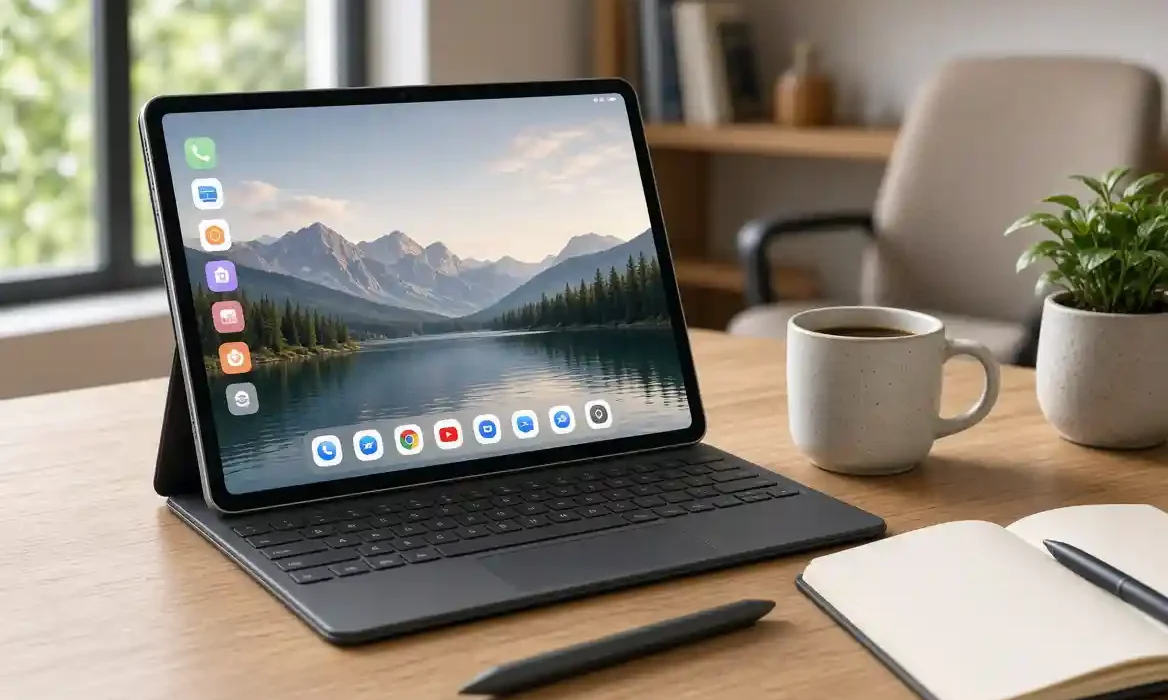
By For fifteen years, Amazon tablets have meant compromise: cheap hardware, a locked-down fork of Android called Fire OS, and an app store that made you sideload YouTube. The Amazon Alexa Tablet 12 Pro is a clean break. Announced on 8 October 2026, it is not a Fire tablet with a new name. Amazon describes it as an all-new product line with new hardware, new software and a new purpose, and for the first time the company is aiming squarely at the iPad Air and Galaxy Tab S9 series.
This Amazon Alexa Tablet 12 Pro review pulls together Amazon’s official announcements, developer specifications and early hands-on reporting to explain what the 12 Pro actually offers, where it excels, and where you should still be cautious. Pricing starts at $499.99 in the US for the standard model and $549.99 for the Nanomatte version, with UK availability from 19 October starting at £449.99.
What is the Alexa Tablet 12 Pro and why does it matter?
Amazon launched three tablets at once: the 8.7-inch Alexa Tablet 8, the 11-inch Alexa Tablet 11, and the flagship 12 Pro. All three run Android with full Google Play Store access out of the box, alongside built-in Amazon apps like Prime Video, Kindle, Audible and Luna. That change alone is significant. You no longer need to find workarounds for Gmail, Google Docs, Netflix or YouTube.
The 12 Pro is the only model to get the top-tier chip, quad speakers, Wi-Fi 6E, support for keyboard and pen accessories, and the optional Nanomatte display. Amazon calls it the most advanced tablet it has ever built, claiming nearly three times faster processing and nine times faster graphics than any previous Amazon tablet. Those are manufacturer claims, not independent benchmarks, and until full reviews with sustained performance testing appear, they should be treated as indicative rather than proven.
Design, build quality and display experience
The design language is a step change from Fire tablets. The Alexa Tablet 12 Pro is stamped from a single piece of aluminium, measures just 6.5mm thin and weighs 550g. That makes it lighter than the 13-inch iPad Air at 617g, though heavier than the 11-inch iPad Air at 465g. It comes in Graphite only at launch.
The headline is the display. It is a 12-inch LCD with a resolution of 2800 x 1840, giving 280 PPI, a 120Hz refresh rate and a 3:2 aspect ratio. The 3:2 choice is unusual for Android tablets, which usually favour 16:10. In practice, 3:2 gives you more vertical space for documents, web pages and books, closer to a sheet of A4 paper. For video you get small black bars, but for reading and split-screen work it is more useful.
The 120Hz refresh rate matters more than resolution on a tablet this size. Scrolling in Chrome, swiping between apps and annotating a PDF feels smoother and more immediate than on 60Hz tablets, including the entry-level iPad. Amazon lists both models as supporting up to 120Hz, not just the Nanomatte version.
Four Dolby Atmos-tuned speakers sit on the edges, and early hands-on impressions note noticeably better separation than previous Fire Max models. Connectivity is Wi-Fi 6E, not Wi-Fi 7, with a USB-C port that supports charging, audio, DisplayPort out and data at USB 3.2 Gen 1 speeds up to 5Gbps. The cameras are modest but functional: 13MP rear and 8MP front, both recording 1080p video, positioned on the long edge for video calls.
Amazon Alexa Tablet 12 Pro Nanomatte display: who actually benefits?
The most talked-about feature is exclusive to the 12 Pro: the optional Alexa Tablet 12 Pro Nanomatte display. It costs $50 more in the US and, according to UK retailer listings, £50 more in the UK.
Unlike conventional matte tablets that sandblast the surface and scatter light, Amazon says it worked with Corning on a photolithography process that etches a precise, pixel-aligned texture into the glass at sub-pixel level. The aim is to cut reflections while preserving colour accuracy, contrast and sharpness.
In practice, hands-on reports from Gizmodo, Stuff and Expert Reviews describe a paper-like finish that dramatically reduces glare under office lighting and outdoors, with text that appears to sit on the glass rather than beneath it. That has three practical benefits:
- Reading: Less eye strain during long Kindle sessions, especially with Amazon’s new Kindle Sanctuary mode.
- Writing and drawing: The etched surface adds slight friction, so the Pro Pen feels more like pen on paper than stylus on glass.
- Working in bright rooms: Contrast holds up better than on glossy screens, useful if you use the tablet near a window or in a kitchen.
The trade-off is familiar from similar technologies like Apple’s nano-texture glass and TCL’s NXTPAPER. In very dim environments, blacks may not look quite as deep as on the standard glossy panel, and if you mainly watch HDR video in a dark room, the standard display will look punchier. If you read, work or sketch for hours, Nanomatte is the more comfortable choice.
Performance, multitasking and everyday productivity
Under the hood, the Amazon Alexa Tablet 12 Pro specs centre on the MediaTek Dimensity 8400, a 4nm octa-core chip with eight Arm Cortex-A725 cores clocking up to 3.25GHz. The standard model ships with 8GB RAM and 128GB storage. The Nanomatte model is available in 8GB / 128GB and 16GB / 256GB configurations using UFS 3.1 storage. MicroSD expansion is not supported.
Amazon’s own documentation lists up to 16GB RAM for the Nanomatte variant only, which has led to some confusion in early coverage. The developer spec table confirms 8GB for the standard 12 Pro and 8GB or 16GB for the Nanomatte version.
For everyday use, this is a major leap over the Fire Max 11. The Dimensity 8400 is a mid-range flagship chip from MediaTek’s 2024/25 generation, designed for efficient multi-window work, 4K streaming and mainstream gaming rather than high-end video editing or local AI inference. Expect smooth app switching, stable split-screen with two or three apps, and solid performance in games like Call of Duty Mobile or Genshin Impact at medium settings, but do not expect iPad Pro M-series levels of headroom.
Multitasking is improved in software too. The tablet supports free-form multi-window, drag-and-drop between apps, and work and personal profile switching. The optional accessories are key to productivity.
Android software, Google Play Store access and Alexa+ features
The software shift is arguably more important than the hardware. The tablets run Android, with Amazon’s own For You feed and Dynamic Tab surfacing your Prime Video, Kindle and Audible content. Because Google Play Store is pre-installed, you get native access to millions of apps including YouTube, Netflix, Gmail, Slack, and creative tools that never worked reliably on Fire OS.
Built into the core is Alexa+, Amazon’s updated AI assistant. You can summon it by voice or tap the Ask Alexa button. Features include:
- On-Screen Intelligence: With explicit opt-in, Alexa can read what is on your screen to provide contextual help, for example summarising a trail list and suggesting which hike suits you, or adding a sports schedule to your calendar and flagging conflicts.
- Live sessions: A continuous hands-free conversation without repeating the wake word.
- Private by design: Amazon says On-Screen Intelligence is off by default, requires opt-in, and shows a visual indicator whenever active.
It is early to judge Alexa+ against Google Assistant or Siri. The promise is personalisation from the moment you sign in, but practical usefulness will depend on accuracy, latency and how many apps support on-screen context. Early demos were brief and controlled, so independent testing is still needed.
Reading, streaming, gaming and entertainment
Reading is where Amazon leans on its Kindle heritage. Opening a book in the Kindle app triggers what Amazon calls Kindle Sanctuary: notifications go silent, blue light is reduced, and Amazon claims battery life stretches to 20 hours for reading, versus 16 hours for video playback. Three themes are offered: standard, Color Paper with softened tones, and pure grayscale.
With the Pro Pen, you can highlight, underline, write margin notes and mark up PDFs, with annotations syncing to Kindle Scribe and other pen-supported Kindle apps. That makes the 12 Pro a hybrid Kindle and notebook, something no iPad can do natively with Kindle books.
For streaming, the 3:2 display is less cinematic than 16:10, but the higher pixel density, 120Hz and quad Dolby Atmos speakers make for a strong portable player. Gaming benefits from the faster GPU claim, but again, independent thermal and frame-rate testing has not yet been published.
Amazon Alexa Tablet 12 Pro battery life, speakers, connectivity and accessories
Official Amazon Alexa Tablet 12 Pro battery life figures are 16 hours of video playback for both display options, and up to 20 hours in Kindle reading mode. As always, treat those as lab figures with brightness and volume at moderate levels. Real mixed-use battery life will be lower, especially with 120Hz enabled and Alexa+ live sessions active.
Accessories are sold separately and designed only for the 12 Pro:
- Pro Keyboard ($149.99): Magnetically attaches with no Bluetooth pairing, includes a trackpad and turns the tablet into a laptop-style workstation.
- Pro Pen ($89.99): USI 2.0 active pen with 4,096 levels of pressure, tilt detection, magnetic docking and wireless charging.
- Folio Cover: Protective cover in matching colours.
Amazon has not confirmed UK accessory pricing yet, but based on US pricing, expect the keyboard around £139-£149 and pen around £79-£89.
Alexa Tablet 12 Pro price, availability and comparison
Alexa Tablet 12 Pro price in the US starts at $499.99 for 8GB/128GB standard display and $549.99 for Nanomatte. In the UK, listings from T3 and What Hi-Fi? put the starting price at £449.99 standard and £499.99 Nanomatte. Orders opened 8 October 2026, shipping from 14 October in the US, Mexico and Canada, and from 19 October in the UK, Germany, France, Italy and Spain.
Entry-level configurations of the Alexa Tablet 8 and 11 include lock-screen ads, removable for $20 according to Droid Life reporting. Amazon has not said whether the 12 Pro includes ads in its base model, so check the listing at checkout.
Alexa Tablet 12 Pro vs iPad Air
The natural competitor is not the iPad Pro, despite some headlines, but the iPad Air. Apple’s 11-inch iPad Air starts at $599/$599 in the UK, the 13-inch at $799/$799. Both use an M2 chip, have 60Hz displays in the current generation, and longer promised software support.
- Display: 12 Pro offers 120Hz vs 60Hz on iPad Air, and 3:2 vs 4:3. iPad Air has a brighter, more colour-accurate P3 LCD and better app optimisation for tablets.
- Performance: M2 is substantially faster for creative apps and has better efficiency. Dimensity 8400 is strong for an Amazon tablet, but remains mid-range Android.
- Software: iPadOS has more mature tablet multitasking and pro apps. Alexa 12 Pro has full Android and Google Play, which is a huge improvement over Fire OS, plus deeper Kindle and Alexa integration.
- Value: 12 Pro undercuts iPad Air by $100-$250, and Nanomatte is cheaper than Apple’s nano-texture option which only exists on iPad Pro.
- Accessories: Apple Pencil and Magic Keyboard are more polished but significantly more expensive. Amazon’s keyboard and pen bundle costs less than Apple’s keyboard alone.
Against Android rivals like the Samsung Galaxy Tab S9 FE+ ($599) or OnePlus Pad 2, the 12 Pro sits in a similar price band but stands out for its Nanomatte option and reading focus. Samsung offers longer update commitments and included S Pen, which Amazon has not matched with a public update timeline.
Main advantages and disadvantages
Advantages:
- High-resolution 12-inch 280 PPI display with 120Hz and 3:2 aspect ratio for work and reading
- Optional Nanomatte anti-glare display developed with Corning, unique at this price
- Major performance uplift with MediaTek Dimensity 8400 and up to 16GB RAM
- True Android with Google Play Store, ending Fire OS sideloading frustrations
- Excellent Kindle Sanctuary reading mode with up to 20 hours claimed reading battery
- Competitive pricing under iPad Air, with cheaper keyboard and pen accessories
Disadvantages:
- No OLED option, and no Wi-Fi 7 or 5G model announced
- Manufacturer performance claims not yet independently verified; no long-term benchmark data
- Software update policy not specified; Samsung and Apple offer longer support
- Standard model limited to 8GB RAM and 128GB base storage with no microSD
- Alexa+ usefulness depends on real-world accuracy still to be tested
- Only Graphite colour for Pro model; heavier than 11-inch iPad Air
Who should buy it — and who may be better served elsewhere?
Buy the Alexa Tablet 12 Pro if you read a lot in Kindle, want an anti-glare screen without paying iPad Pro prices, and have been frustrated by Fire tablets but still live in Amazon’s ecosystem. It also makes sense as a affordable productivity tablet for students who need Google Docs, split-screen and pen notes.
Consider an iPad Air if you rely on pro creative apps, want the longest software support, or already own Apple Pencil accessories. Choose Samsung Galaxy Tab S9 series if you want OLED, an included S Pen and DeX desktop mode, or need guaranteed multi-year Android updates.
Final verdict based on available evidence
The Amazon Alexa Tablet 12 Pro is not an iPad killer, and Amazon does not claim it is. It is something more interesting: the first Amazon tablet that does not ask you to accept a compromised software experience to get a decent price.
The combination of a 12-inch 120Hz 3:2 display, optional Nanomatte finish, genuine Android with Play Store access, and a focused Kindle reading mode fills a gap between cheap media tablets and expensive pro tablets. At $499.99 / £449.99 it undercuts the iPad Air while offering a smoother screen and a more comfortable reading experience.
What we still need to verify is sustained performance under load, real battery life with mixed use, and how useful Alexa+ On-Screen Intelligence proves in daily life. If those hold up in independent testing, the 12 Pro will be the best tablet Amazon has ever made by a clear margin, and a credible alternative for readers and light productivity users who do not need the full power of an iPad Pro.
For more detail, see Amazon’s official Alexa Tablet announcement and the Alexa 12 Pro developer specifications. Early hands-on context from TechCrunch and Liliputing’s spec comparison also help clarify configurations.
FAQs
What are the Amazon Alexa Tablet 12 Pro specs?
The 12 Pro has a 12-inch 2800 x 1840 display (280 PPI, 120Hz, 3:2), MediaTek Dimensity 8400 4nm octa-core chip, 8GB RAM standard or 8GB/16GB with Nanomatte, 128GB or 256GB UFS 3.1 storage, Wi-Fi 6E, quad Dolby Atmos speakers, 13MP rear and 8MP front cameras, USB-C with DisplayPort and USB 3.2 Gen 1, and claims up to 16 hours video playback or 20 hours reading in Kindle mode.
What is the Alexa Tablet 12 Pro Nanomatte display and is it worth it?
Nanomatte is an optional anti-glare display exclusive to the 12 Pro, made with Corning using a pixel-aligned etched texture. It reduces reflections without the haze of typical matte screens, improves readability in bright light and adds friction for pen use. It costs $50 / £50 extra. It is worth it if you read, write or work for long periods in bright environments; choose the standard glossy panel if you prioritise punchier HDR video in dark rooms.
How much does the Amazon Alexa Tablet 12 Pro cost in the UK and US?
In the US, the standard display starts at $499.99 and Nanomatte at $549.99. In the UK, listings show £449.99 standard and £499.99 Nanomatte. Accessories are extra: Pro Keyboard $149.99 and Pro Pen $89.99 in the US. Shipping starts 14 October 2026 in North America and 19 October 2026 in the UK and EU.
Does the Alexa Tablet 12 Pro have Google Play Store?
Yes. Unlike previous Fire tablets, the new Alexa Tablet line runs Android with full Google Play Store pre-installed. You can download YouTube, Gmail, Netflix, Google Docs, Slack and other Android apps directly, alongside Amazon’s own apps.
How does the Alexa Tablet 12 Pro compare to iPad Air?
The 12 Pro is cheaper, has a larger 120Hz display versus 60Hz on current iPad Air, and offers a Nanomatte anti-glare option and deeper Kindle integration. The iPad Air has a faster M2 chip, brighter P3 display, more mature tablet apps, longer confirmed software support and a lighter 11-inch option. For reading and value-focused productivity, the 12 Pro is compelling; for creative pro apps and longevity, iPad Air remains ahead.